Dolphin - Retention Statuses for Treatment Efficiency
We have added some new patient statuses for Retention. Now patients will be put into a retention status that correlates with the active treatment completed:
- Retention full for full braces
- Retention Phase 2 for Phase 2 patients
- Retention Aligners for Invisalign/Aligner patients
- Retention Limited/Other for Limited and Other treatment patients
If you didn’t already have a Between Phases/Phase II Pending/OBS3 or similar status for post Phase I patients, we have added that as well.
To track debands, it is important that each patient’s status is changed to the correct retention status by the deband appointment types that signify the end of an active treatment. We have modified your deband appointments to automatically change or prompt for the new status.
When prompted with a choice of Retention status, view the patient’s current status to determine the correct Retention Status:
- Full Braces treatments → Retention Full
- Invisalign/Aligner treatments → Retention Invisalign/Aligners
- Limited and Other treatments → Retention Limited/Other
- Phase 2 treatments → Retention Phase 2
- Phase 1 treatments → Between Phases/Pending Phase 2/OBS3 or similar
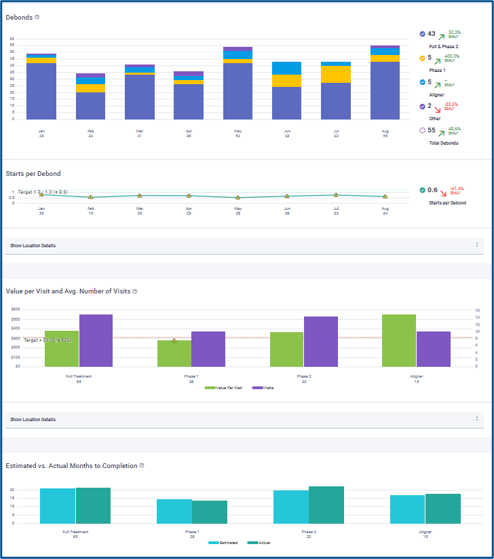
The Gaidge Treatment Efficiency tab, lets you view and track your:
- Debonds (by type of treatment)
- Starts Per Debond
- Value per Visit and Average Number of Visits
- Estimated Vs. Actual Months to Completion